


Page 144 - CSharp/C#
P. 144
foreach(var attribute in typeof(MyClass).GetCustomAttributes()) {
             Console.WriteLine(attribute.GetType());
         }


        GetCustomAttribute extension method from System.Reflection.CustomAttributeExtensions retrieves a
        custom attribute of a specified type, it can be applied to any MemberInfo.


         var attribute = (MyCustomAttribute)
         typeof(MyClass).GetCustomAttribute(typeof(MyCustomAttribute));


        GetCustomAttribute also has generic signature to specify type of attribute to search for.


         var attribute = typeof(MyClass).GetCustomAttribute<MyCustomAttribute>();


        Boolean argument inherit can be passed to both of those methods. If this value set to true the
        ancestors of element would be also to inspected.


        DebuggerDisplay Attribute


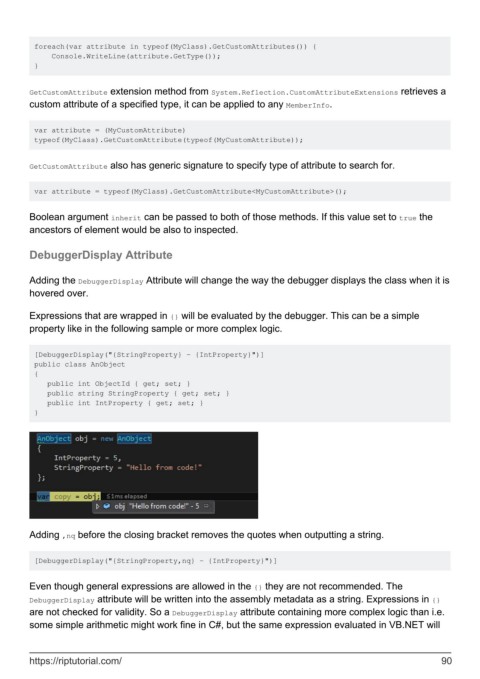
        Adding the DebuggerDisplay Attribute will change the way the debugger displays the class when it is
        hovered over.

        Expressions that are wrapped in {} will be evaluated by the debugger. This can be a simple
        property like in the following sample or more complex logic.


         [DebuggerDisplay("{StringProperty} - {IntProperty}")]
         public class AnObject
         {
            public int ObjectId { get; set; }
            public string StringProperty { get; set; }
            public int IntProperty { get; set; }
         }


        Adding ,nq before the closing bracket removes the quotes when outputting a string.


         [DebuggerDisplay("{StringProperty,nq} - {IntProperty}")]


        Even though general expressions are allowed in the {} they are not recommended. The
        DebuggerDisplay attribute will be written into the assembly metadata as a string. Expressions in {}
        are not checked for validity. So a DebuggerDisplay attribute containing more complex logic than i.e.
        some simple arithmetic might work fine in C#, but the same expression evaluated in VB.NET will


        https://riptutorial.com/                                                                               90

